How To Program A Garage Door Opener: Step-by-Step Guide
Learning How To Program A Garage Door Opener is an essential skill for homeowners who want reliable, secure access to their garage. Whether you’ve purchased a new remote, performed a garage door opener replacement, or your garage door opener remote not working has become a daily frustration, proper programming restores smooth operation quickly.
Modern openers are designed for simple garage door opener programming, but the exact steps can vary depending on the brand, remote type, and system configuration. In this expert guide, you’ll discover the correct garage door opener setup process, common troubleshooting fixes, and when to call a professional garage door opener programming service in Lewisville, TX.
Why Proper Garage Door Opener Programming Matters
Correctly programming your opener does more than just make the door move. It directly affects safety, security, and long-term performance. When homeowners try to program garage door opener systems without following the right procedure, they often encounter signal conflicts, memory errors, or syncing failures.
A properly configured system ensures your residential garage door opener or commercial garage door opener responds instantly to commands. It also enables advanced garage door opener safety features, including rolling code protection and smart connectivity. Many service calls for garage door opener repair in Lewisville, TX actually stem from incomplete setup rather than hardware failure.
Tools and Information You’ll Need Before You Start
Before you begin the garage door remote programming process, take a moment to gather the right items and confirm compatibility. This preparation prevents delays during the garage door opener pairing process.
Your wireless garage door remote or keypad
Access to the learn button garage door opener unit on the motor
Once these basics are ready, you can move confidently into the automatic garage door opener setup phase.
Step-by-Step: How To Program A Garage Door Opener
The exact garage door opener programming steps may differ slightly by manufacturer, but the core method remains consistent across most modern systems. Follow this professional garage door opener setup guide carefully.
Step 1: Locate the Learn Button
Step 2: Activate the Remote
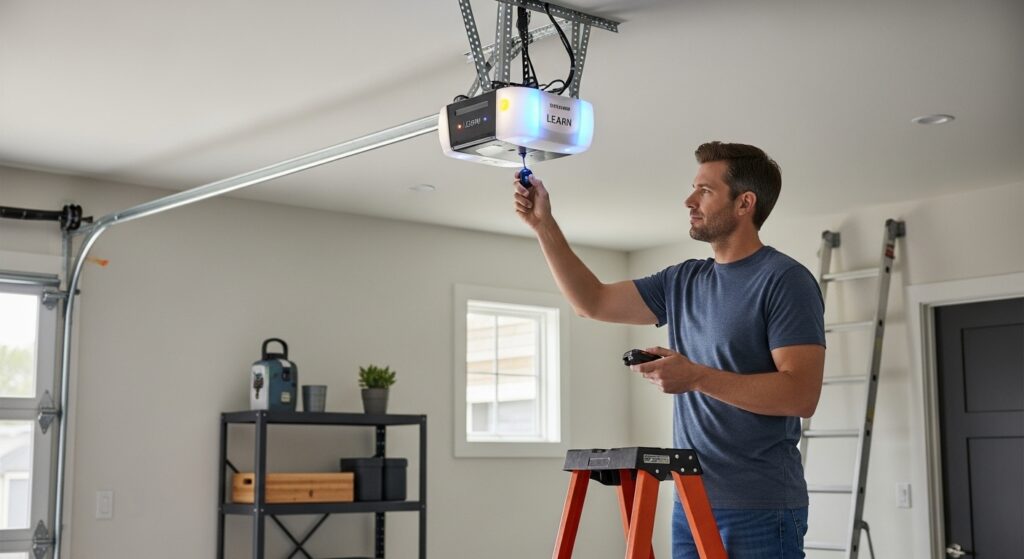
The first step in how do I program my garage door opener is locating the garage door opener learn button location. This button is typically found on the motor housing mounted to the ceiling. Common places to check include behind the light cover, on the rear or side panel, or near the antenna wire. Pressing this button puts the opener into garage door opener signal programming mode. Most units provide a garage door opener programming time limit of about 30 seconds to complete the pairing process.
Within the programming window, press and hold the remote button you want to use. This completes the pair garage door opener remote process. You may see the opener light flash or hear a click, confirming successful garage door clicker programming.
This same approach works for most remote control garage door opener systems, including newer rolling code garage door opener models.
Step 3: Test the Connection
After completing the opener remote sync, test the door from a safe distance. If the door moves smoothly, your garage remote programming is complete. If not, you may need to reprogram garage door opener memory or perform additional garage door opener troubleshooting steps.
Programming a Keypad or Wall Control
Many homeowners in Lewisville, TX also want to handle programming garage door keypad devices or garage door wall button programming. These components follow a similar process but usually require entering a secure PIN. For keypad garage door programming, you typically press the learn button on the opener, enter your desired PIN on the keypad, and then press enter to confirm the setup. This completes the garage door controller setup and enables secure keyless entry. Proper home garage door opener setup improves both convenience and overall security.
Universal Garage Door Remote Programming
If you purchased a replacement remote, universal garage door remote programming may require an extra compatibility step. Not all remotes work with every opener, so always verify garage door opener compatibility before starting.
Universal remotes often include brand-selection steps before the standard garage door transmitter programming process. When done correctly, they function just like original equipment and can support multi-button remote programming for multiple doors.
Common Programming Problems and Fixes
Even when following instructions, homeowners sometimes encounter issues during garage door opener programming. Most problems are simple to resolve with targeted troubleshooting.
| Problem | Likely Cause | Quick Fix |
| Garage door opener not responding | Memory full or signal conflict | Perform garage door opener memory reset |
| Remote not syncing | Dead battery | Complete garage door opener battery replacement |
| Keypad won’t program | Incorrect PIN steps | Repeat garage door keypad programming carefully |
| Intermittent operation | Signal interference | Check for garage door opener signal issues |
| Remote works only nearby | Weak antenna | Inspect wireless garage door remote range |
This quick reference helps homeowners handle most fix garage door opener remote situations without unnecessary service calls.
How To Reset Garage Door Opener Systems
Sometimes the best solution is a full how to reset garage door opener procedure. Resetting clears old codes and resolves many garage door opener not syncing problems.
To perform a garage door opener frequency reset, press and hold the learn button for about 6–10 seconds until the indicator light turns off. This completes the garage door opener memory reset and removes all programmed remotes.
After resetting, repeat the standard garage opener remote setup process. Many technicians recommend this step when dealing with legacy garage door opener programming issues.
Smart Garage Door Opener Setup
Newer systems support Wi-Fi connectivity and mobile apps, making a proper smart garage door opener setup an excellent way to add remote monitoring, scheduling, and real-time alerts. During garage door opener modernization, homeowners typically need to connect the opener to their home Wi-Fi network, install the manufacturer’s mobile application, and complete the in-app pairing steps to finish the integration. Smart systems significantly enhance security and convenience, which is why they are becoming increasingly popular in garage door opener upgrade projects throughout Lewisville, TX.
When DIY Programming Isn’t Enough
While many homeowners successfully learn How To Program A Garage Door Opener, some situations require expert help. If your garage door opener troubleshooting efforts fail repeatedly, the issue may involve wiring faults, receiver damage, or deeper mechanical problems.
Professional technicians can quickly diagnose complex overhead door opener programming failures and ensure your system meets safety standards. This is especially important for commercial garage door opener systems or high-cycle residential units.
Homeowners searching for garage door opener near me or garage door opener Lewisville TX services should look for licensed providers offering full garage door opener installation service and garage door opener repair service support.
Maintenance Tips After Programming
Once your system is working, routine care helps prevent future syncing problems. Consistent garage door opener maintenance improves reliability and extends equipment life.
Regular service should include checking batteries, inspecting the antenna, testing safety sensors, and verifying smooth door travel. Preventive care reduces emergency garage door opener repair needs and keeps your automatic garage door opener setup performing like new.
Choosing Between Repair, Replacement, or Upgrade
Sometimes programming issues signal a bigger problem. If your opener is more than 10–15 years old, frequent garage door opener troubleshooting steps may indicate it’s time for a garage door opener replacement.
Modern systems offer quieter operation, stronger encryption, and improved garage door opener safety features. A qualified technician can recommend whether repair, upgrade, or full garage door opener installation makes the most financial sense.
Local Expert Help in Lewisville, TX
For homeowners in Lewisville, TX, professional service ensures your system works safely and efficiently. Experienced technicians understand regional installation standards and can complete professional garage door opener programming quickly.
Whether you need emergency garage door opener repair, a full garage door opener service, or help with wireless garage door setup, working with a trusted local provider delivers peace of mind and long-term reliability.
Tools and Information You’ll Need Before You Start
Before you begin the garage door remote programming process, take a moment to gather the right items and confirm compatibility. Proper preparation prevents delays during the garage door opener pairing process and helps ensure your automatic garage door opener setup goes smoothly on the first attempt.
To get started, make sure you have the following essentials ready:
- Your wireless garage door remote or keypad
- Access to the learn button garage door opener unit on the motor
Once these basics are prepared, you can confidently move forward with the programming steps and reduce the chances of common syncing errors.
Final Thoughts
Understanding How To Program A Garage Door Opener empowers homeowners to maintain reliable, secure garage access without unnecessary service calls. With the right approach to garage door opener programming, most remotes, keypads, and smart systems can be synced in just a few minutes.
However, if your garage door opener not responding issues persist after troubleshooting, it may indicate deeper mechanical or electrical problems. In those situations, contacting a professional garage door opener programming specialist in Lewisville, TX is the safest and most efficient solution.
By combining proper setup, routine garage door opener maintenance, and timely professional support when needed, you can ensure your garage door system operates smoothly, safely, and reliably for years to come.
FAQs
How do I program my garage door opener remote?
To complete how to program garage door remote, press the learn button on the opener, then press the remote button within the programming window. The opener light usually flashes to confirm successful door opener remote pairing.
Why won’t my garage door remote program?
If why won’t my garage door remote program is your concern, the most common causes are dead batteries, incompatible remotes, or a full opener memory. Performing a garage door opener memory reset often resolves the issue.
Where is the learn button on a garage door opener?
The garage door opener learn button location is typically on the motor unit mounted to the ceiling. Look under the light cover or near the antenna wire. Its color may vary by manufacturer.
How long does it take to program a garage door opener?
Most steps to program garage door opener procedures take less than five minutes. However, troubleshooting or universal garage door remote programming may take slightly longer depending on compatibility.
When should I call a professional garage door opener service?
You should contact a technician if your garage door opener not responding persists after resetting, if wiring appears damaged, or if repeated garage door opener troubleshooting attempts fail. Professional service ensures safe and reliable operation.
Mastering How To Program A Garage Door Opener saves time, improves security, and keeps your garage functioning smoothly. With the step-by-step process above, most homeowners can handle programming confidently—while knowing when expert help in Lewisville, TX is the smarter choice.
